More Info on "Page Forward / Back Method Settings"
The "◀︎ Back" window and the "Next ▶︎" window each have four buttons: "Blink", "Head Tilt", "Face Movement", and "Smile".
The "◀︎ Back" window also has a "Scan ON/OFF" button that turns page-back scanning on or off, as described below.
The "◀︎ Back" window also has a "Scan ON/OFF" button that turns page-back scanning on or off, as described below.
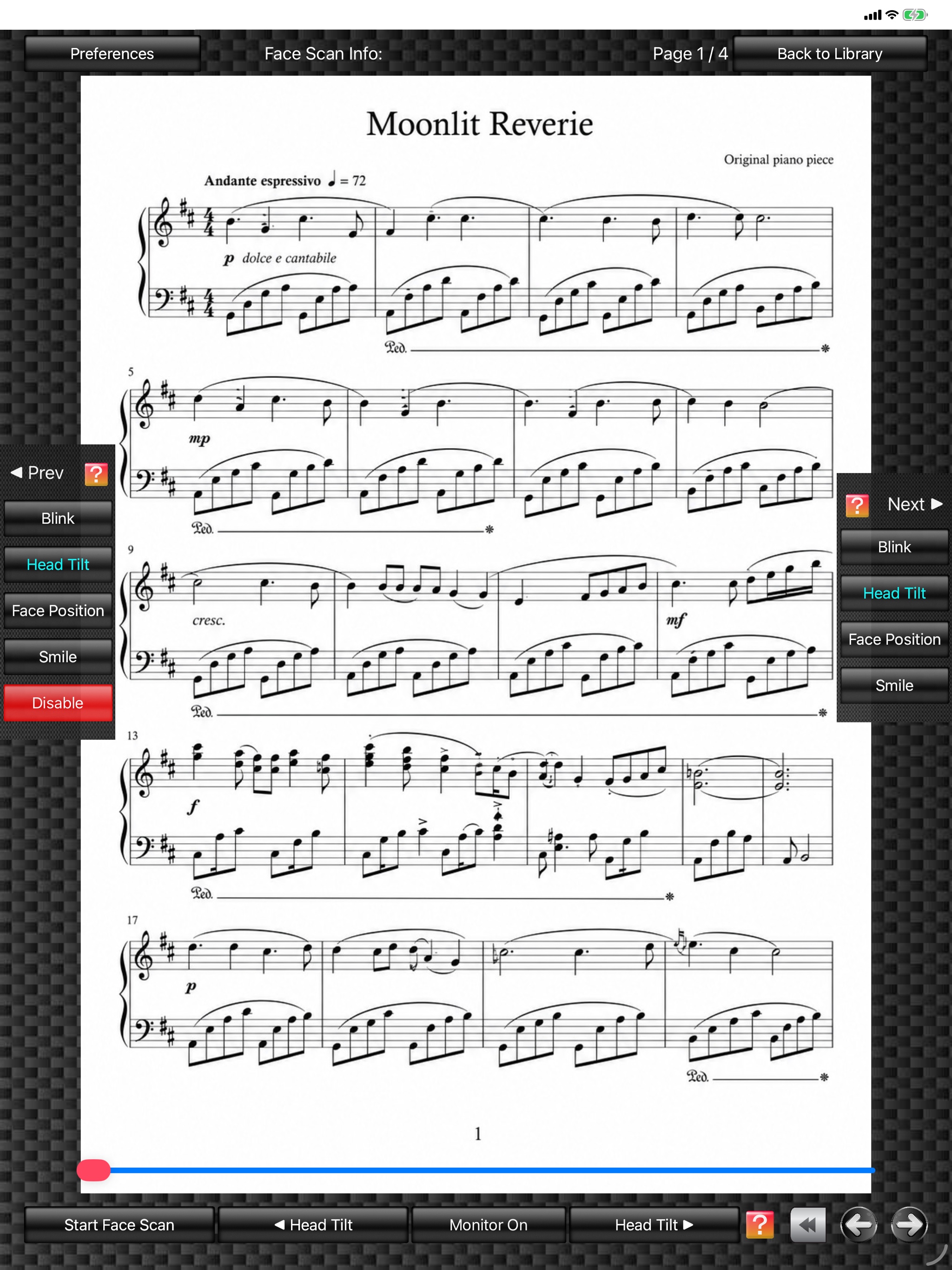
(The score image is an original image generated by AI.)
1.
Tapping the "Blink" button detects both eyes closed and turns the score page after both eyes have remained closed for the specified time.
2.
Tapping the "Head Tilt" button detects the tilt angle of your face and turns the score page after the face has stayed tilted beyond the specified angle for the specified time.
3.
Tapping the "Face Movement" button detects the position of your face within the front camera view and turns the score page after the face movement has exceeded the specified amount for the specified time.
4.
Tapping the "Smile" button detects a smile and turns the score page after the smile has continued for the specified time.
5.
Tapping the "Scan ON/OFF" button in the "◀︎ Back" window switches page-back scanning on or off.
The "Prev Interval Time", "Next Interval Time", "Head Tilt Angle", and "Face Movement" values described above can be set in the "Preferences" window.
In FPT+, if you use the "Order Editor" function to copy score images and arrange them in advance according to repeat signs, you can display the score in performance order using only page-forward actions.
In such cases, tapping the "Scan OFF" button in the "◀︎ Back" window to disable page-back scanning helps prevent unnecessary accidental page-back actions.
Even when page-back scanning is stopped because "Scan OFF" has been selected in the "◀︎ Back" window, page-back can remain possible for a certain period immediately after a page has been turned forward.
With this function, if a page is turned forward accidentally, you can still turn it back for a certain period immediately afterward. This period can be set with "Prev Effective Time" in the "Preferences" window. Its default value is "0".
The "Prev Interval Time", "Next Interval Time", "Head Tilt Angle", and "Face Movement" values described above can be set in the "Preferences" window.
In FPT+, if you use the "Order Editor" function to copy score images and arrange them in advance according to repeat signs, you can display the score in performance order using only page-forward actions.
In such cases, tapping the "Scan OFF" button in the "◀︎ Back" window to disable page-back scanning helps prevent unnecessary accidental page-back actions.
Even when page-back scanning is stopped because "Scan OFF" has been selected in the "◀︎ Back" window, page-back can remain possible for a certain period immediately after a page has been turned forward.
With this function, if a page is turned forward accidentally, you can still turn it back for a certain period immediately afterward. This period can be set with "Prev Effective Time" in the "Preferences" window. Its default value is "0".
<Note>
- For "Blink" scan, which detects whether both eyes are closed, wearing glasses may lower sensitivity.
- "Blink" scan and "Smile" scan cannot be selected at the same time for both "◀︎ Back" and "Next ▶︎".
- In "Blink" or "Smile" scan, looking downward may be mistakenly recognized as a blink or smile.
- In "Head Tilt" scan, turning your face fully sideways may be mistakenly recognized as head tilt.
- "Blink" scan and "Smile" scan cannot be selected at the same time for both "◀︎ Back" and "Next ▶︎".
- In "Blink" or "Smile" scan, looking downward may be mistakenly recognized as a blink or smile.
- In "Head Tilt" scan, turning your face fully sideways may be mistakenly recognized as head tilt.
