Page Forward / Back Method Settings
Tapping the two "Scan Select ◀︎/▶︎" buttons on the left and right of the lower center of the Score Viewer displays the "◀︎ Back" and "Next ▶︎" windows on the left and right sides of the screen.
You can set the page forward/back methods by tapping buttons in these windows.
For example, you can freely set "Next ▶︎" to "Smile" and "◀︎ Back" to "Blink".
In "Combination Mode", these methods can be combined. (See More Info on Preferences for details)
The window closes when you tap a button in it or tap the corresponding "Scan Select ◀︎/▶︎" button again.
You can set the page forward/back methods by tapping buttons in these windows.
For example, you can freely set "Next ▶︎" to "Smile" and "◀︎ Back" to "Blink".
In "Combination Mode", these methods can be combined. (See More Info on Preferences for details)
The window closes when you tap a button in it or tap the corresponding "Scan Select ◀︎/▶︎" button again.
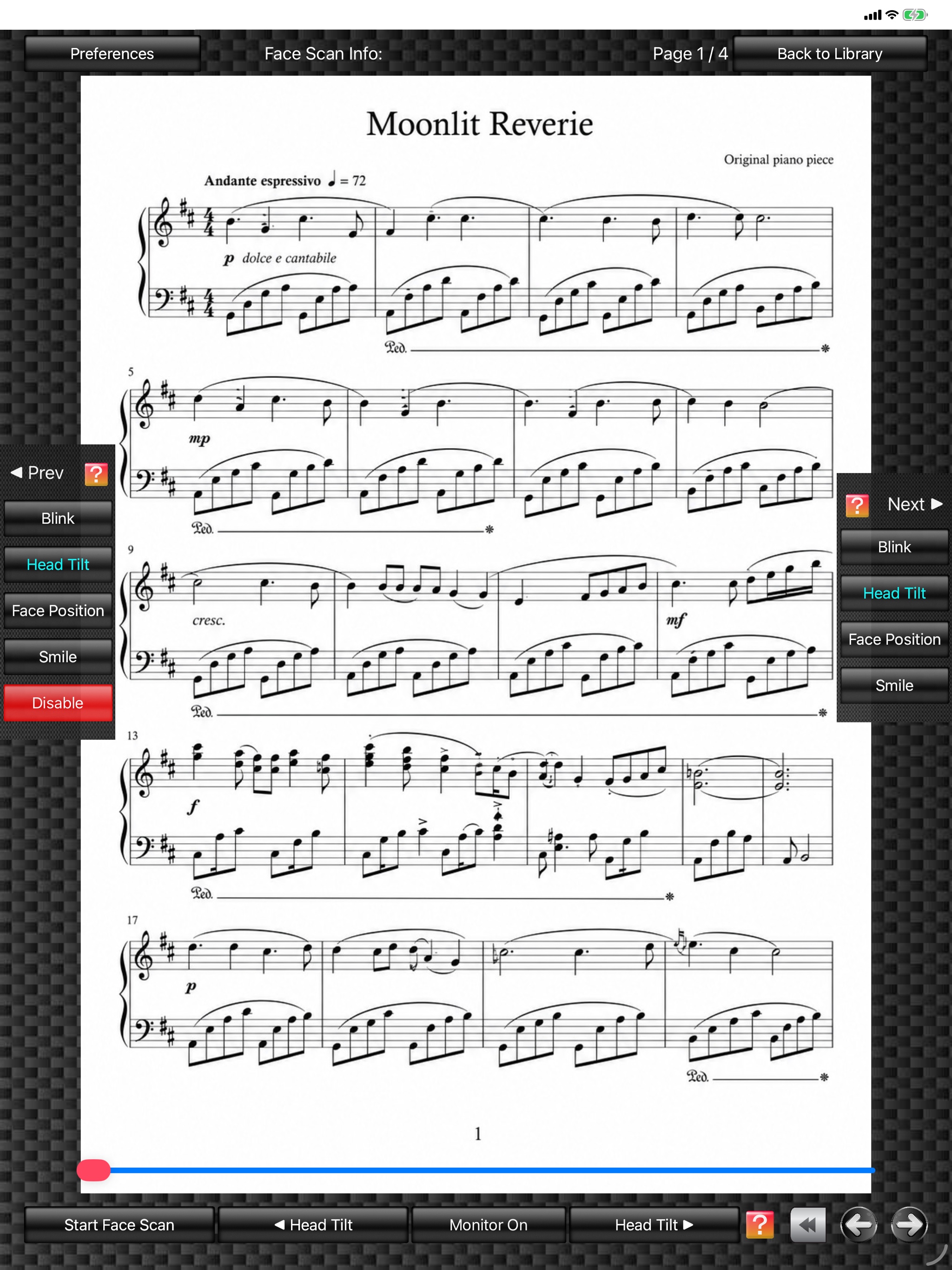
Score Viewer
(The score image is an original image generated by AI.)
(The score image is an original image generated by AI.)