More Info on "Preferences (Voice Scan)"
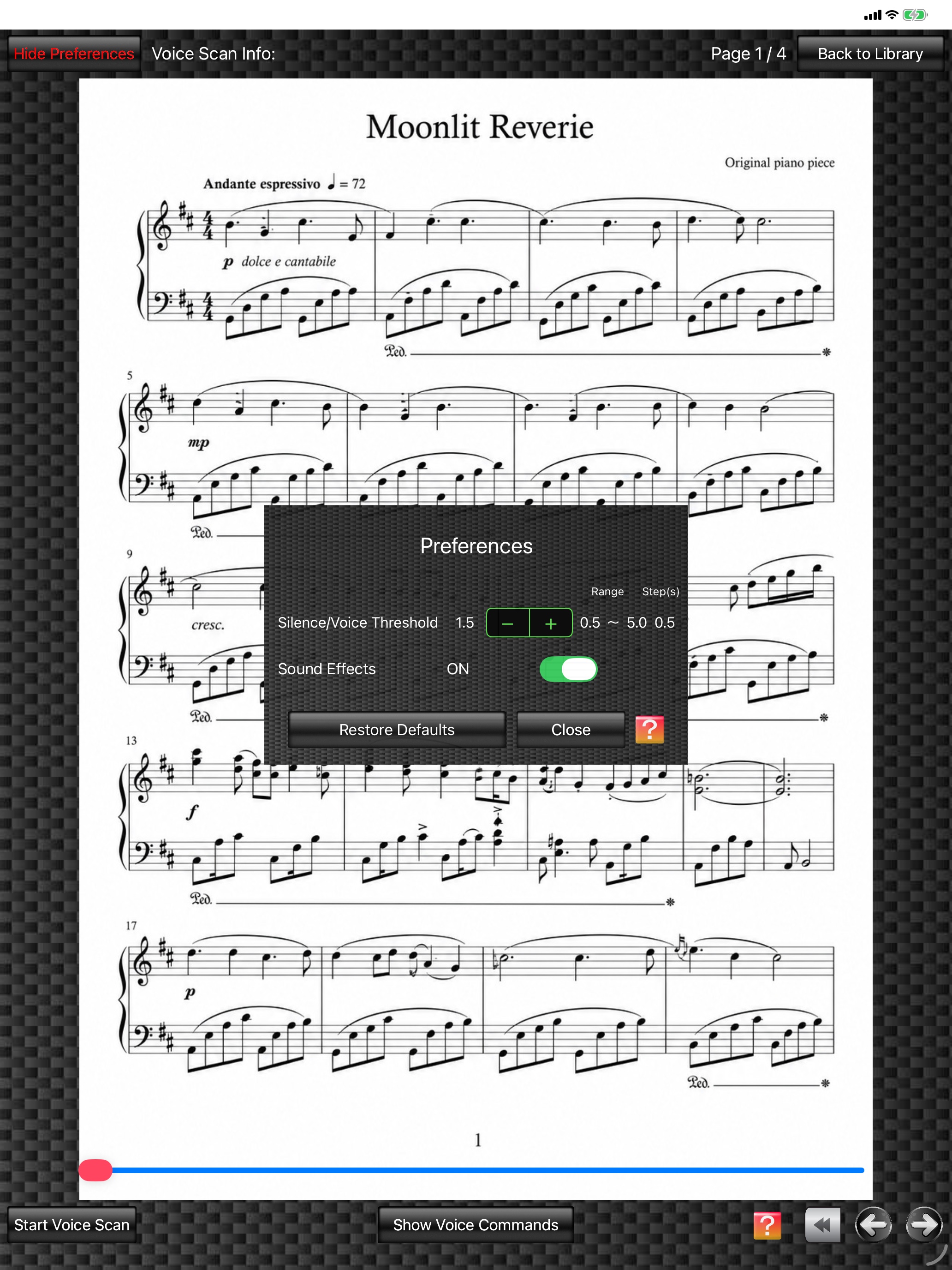
In the "Preferences" window, you can set the "Silence/Voice Threshold" and turn "Sound Effects" on or off.
(The score image is an original image generated by AI.)
1.
FPT+ recognizes voices whose volume level, as picked up by the iPhone/iPad microphone, exceeds a specified level. This level is the "Silence/Voice Threshold".
The lower this threshold value is, the higher the voice recognition sensitivity becomes. However, if sensitivity is too high, background sounds, including instrument sounds, may also be picked up and voice command accuracy may decrease.
The default value is 1.5. Changed settings are saved and used again the next time the app starts.
The lower this threshold value is, the higher the voice recognition sensitivity becomes. However, if sensitivity is too high, background sounds, including instrument sounds, may also be picked up and voice command accuracy may decrease.
The default value is 1.5. Changed settings are saved and used again the next time the app starts.
2.
Setting "Sound Effects" to "OFF" mutes the page-turning sound effects in the "Score Viewer".
3.
Tapping the "Restore Defaults" button restores all settings in "Preferences" to their default values.
4.
Tapping the "Close" button closes the "Preferences" window.
